Most operators do not have a reviews strategy problem. They have a reviews admin problem: nobody sees the one-star until Thursday, replies get written by whoever has a spare minute, and the invitation never goes out at all.
Google review management software turns that into a managed process rather than a memory test. Reviews are one of three jobs an AI agent takes on for a small business — [→ what an AI agent handles for a local business] covers all three. This guide covers the software side of this one: how it connects, how it alerts you, how replies get written, how invitations go out, and what it tells you about why your rating is where it is.
How it connects to your profile
Anything worth using connects through an official Google sign-in with minimum permissions, and never asks for your password. You should be able to revoke that access in one click and have the tool stop working immediately.
This is worth checking first because it is where the sketchier end of the category shows itself. A vendor asking for your Google account password, rather than sending you through Google’s own authorisation screen, is telling you something about how the rest of it is built.
Alerting: one- and two-star reviews, within hours
A negative review left unanswered for a week is not a rating problem. It is the first thing your next customer reads, sitting under your name with nothing beside it.
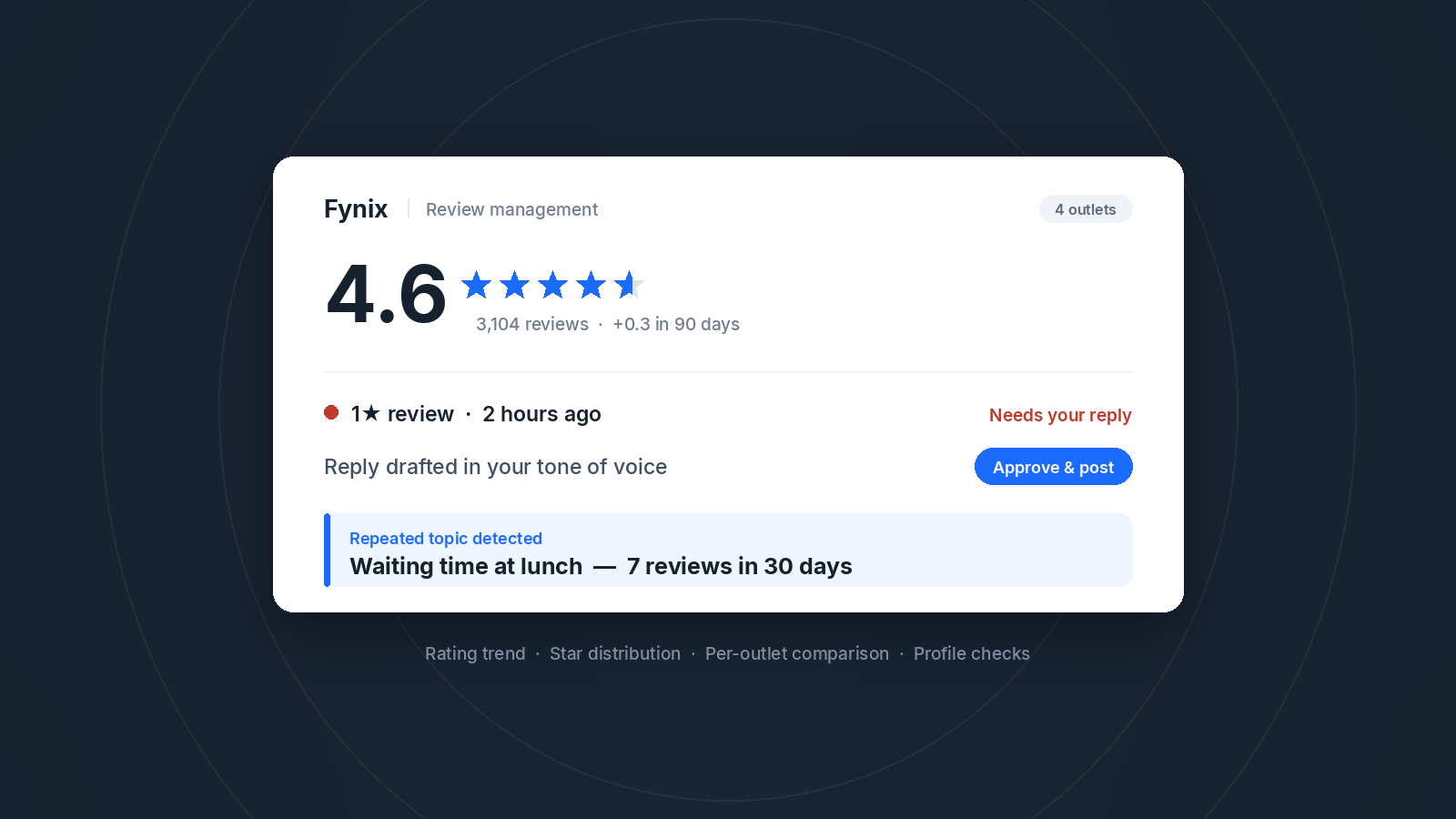
Fynix pushes one- and two-star reviews to you within hours rather than in a daily or weekly digest. The distinction matters because the value of a reply decays quickly: a same-day response reads as a business that pays attention, and the same words two weeks later read as damage control.
For multi-outlet operators, alerting also fixes an ownership gap. Without it, head office learns about an outlet’s bad week from the monthly report.
Replying: drafted in your voice, published under rules you set
The system drafts each reply in your own tone of voice, and you decide what happens next. Five-star reviews can be set to post automatically — thanking a happy customer rarely needs a meeting — while anything critical is held for your approval. You read it, adjust the tone if the situation calls for it, and publish.
That split is the useful part. The blank page is what stops most replies from ever being written, and a draft removes it. But replies to unhappy customers involve judgement about goodwill — what to acknowledge, what to offer, what not to admit in public — and that decision stays with a person. Set the rules once and both cases are handled the way you would want.
Replies are also drafted in the language the customer wrote in, which matters at a counter that fields English and Chinese on the same afternoon.
Inviting: every customer, the same way
Review volume comes down to whether the invitation goes out every time, not to how it is worded. Fynix generates an invitation link you can distribute however suits the business: a QR code at the counter, or a push over WhatsApp or another channel. It can fire automatically when an enquiry is resolved, on a set interval after a visit, or as a batch you send from the console.
Two rules apply whichever you use, and they are worth building in from the start. Google prohibits selectively soliciting positive reviews, so the invitation has to go to every customer rather than the ones you expect to be kind. It also prohibits offering anything in exchange for a review — no voucher, no points, no prize draw. If you are also running member campaigns through [ → AI loyalty software — insert only after that rewrite is live], keep the reward logic away from the invitation. Set it up once, applied to everyone, and it stops being something you think about. One thing that stays with you rather than the software: if invitations go out over the same channels as your marketing, check how PDPA consent applies to your list first.
Diagnosis: what is actually costing you stars
This is the part that separates review management from review admin, and it is the reason to care about the software rather than the task.
Individual reviews tell you about individual visits. What you want to know is which complaint keeps repeating. Fynix identifies recurring topics and counts them over a window — waiting time at lunch appearing in seven reviews in thirty days, or one specific room mentioned four times since April. That turns a vague sense that people are unhappy into a single operational fix with a number attached to it.
It works in the other direction too: the staff member customers keep naming is worth knowing about, and rarely reaches you any other way.
Alongside that sits the basic reporting — rating trend over time and how the stars are distributed — plus profile hygiene checks that catch the quiet damage: public holiday hours you forgot to update, photos that have gone stale, weeks with no activity. A holiday you did not update turns someone’s wasted trip into a one-star, and nobody notices the cause.
Across several outlets
For a chain, the console is most of the value. Every outlet in one view, with rating, new reviews and reply rate side by side, so a week’s replies get cleared in one sitting instead of logging into profiles one at a time.
The comparison is usually the most useful thing a group gets out of this. One branch running half a star below the others is an operational signal, and it rarely surfaces before it shows up in sales. Access can be scoped by role — brand admin across all outlets, area manager for their region, outlet staff for their own store — so a manager sees their own numbers without seeing everyone else’s.
Why reviews are worth the attention
Google’s guidance for Business Profiles lists three things behind local results: relevance, distance and prominence. Prominence is how well known your business is, and Google states directly that more reviews and positive ratings can help your local ranking.
You cannot move your shop closer to the person searching, and you cannot make your category less crowded. Reviews are one of the few levers that stay available — which is why leaving them to whoever remembers is an expensive habit.
What to check before you buy
|
Question
|
Why it matters
|
|
Official Google sign-in, or a password?
|
Anything asking for your Google password should end the conversation.
|
|
How fast is the alert?
|
A daily digest is not alerting. Ask specifically about one- and two-star reviews.
|
|
What publishes without me?
|
You want to set that rule yourself, not inherit the vendor’s default.
|
|
Does the invitation go to everyone?
|
Anything that filters by expected sentiment puts you outside Google’s policy.
|
|
Does it tell me why, or only what?
|
Counting reviews is easy. Naming the complaint that repeats is the part that changes anything.
|
|
One console and role-based access?
|
For a chain this is the whole time saving. Confirm before anything else.
|
|
Does anyone hint they can remove bad reviews?
|
Nobody can. A vendor implying otherwise has told you what else to distrust.
|
Frequently asked questions
Will it publish replies without asking me?
Only where you set that rule. The usual configuration is automatic replies to five-star reviews and held drafts for everything else, so nothing sensitive goes out unread.
Does this work for one outlet, or only chains?
Both, for different reasons. A single outlet gets the alert and the draft, which turns replying from a task into a two-minute job. A chain gets the shared console, the outlet comparison and role-based access.
Can it reply in more than one language?
Yes. Replies are drafted in the language the review was written in.
A concrete first step
Open your Business Profile and check two things: the date of your most recent review, and whether your last negative review has a reply. Those two answers tell you which part of this you need first — the invitations, or the alerting.
If you want to see what that looks like against your own profile, [ talk to us].